Posts

SeekBar with Customization | Android Studio | Kotlin
Image
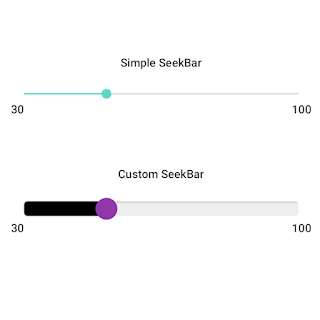
 SeekBar A SeekBar widget is an extension of the widget ProgressBar that adds a draggable thumb. The user can touch the thumb and drag right or left to change the current progress level or use the arrow keys to do the same. You may have seen photo editing apps having features to change the brightness level, blur level, and contrast level. They use SeekBar to change these options.  In this tutorial we will not only learn to use the SeekBar we will also learn how to customize for example its thumb size, color, and background. >>Check For Java<< . Simple SeekBar Let's implement the Simple Seekbar without any customization and handle the progress change listener. I'm just showing progress in TextView, you can do whatever you want. activity_main.xml <?xml version="1.0" encoding="utf-8"?> <RelativeLayout xmlns:android= "http://schemas.android.com/apk/res/android" xmlns:app= "http://schemas.android.com/apk/res-auto" ...

SeekBar with Customization | Android Studio | Java

Image
 SeekBar A SeekBar widget is an extension of the widget ProgressBar that adds a draggable thumb. The user can touch the thumb and drag right or left to change the current progress level or use the arrow keys to do the same. You may have seen photo editing apps having features to change the brightness level, blur level, and contrast level. They use SeekBar to change these options.  In this tutorial we will not only learn to use the SeekBar we will also learn how to customize for example its thumb size, color, and background. >>Check For Kotlin<< . Simple SeekBar Let's implement the Simple Seekbar without any customization and handle the progress change listener. I'm just showing progress in TextView, you can do whatever you want. activity_main.xml <?xml version="1.0" encoding="utf-8"?> <RelativeLayout xmlns:android= "http://schemas.android.com/apk/res/android" xmlns:app= "http://schemas.android.com/apk/res-auto"...

Get Result From Other Activity - Android Studio - Kotlin

Image
How To Get Result From Another Activity Using the registerForActivityResult? In this tutorial, we will learn how to retrieve results from another activity using registerForActivityResult. You may be aware of using the method startActivityForResult, which is now deprecated. So we will use the newer way, which is registerForActivityResult. We will create 2 Activities: the MainActivity and the FormActivity. From the MainActivity, we will launch the FormActivity to input some data and get that data back as a result to the MainActivity. >> Check For Java >> Check For Kotlin >> Check For Compose Code: activity_main.xml <?xml version="1.0" encoding="utf-8"?> <LinearLayout xmlns:android= "http://schemas.android.com/apk/res/android" xmlns:app= "http://schemas.android.com/apk/res-auto" xmlns:tools= "http://schemas.android.com/tools" android:layout_width= "match_parent" android:layout_heig...

Get Result From Other Activity - Android Studio - Java

Image
How To Get Result From Another Activity Using the registerForActivityResult? In this tutorial, we will learn how to retrieve results from another activity using registerForActivityResult. You may be aware of using the method startActivityForResult, which is now deprecated. So we will use the newer way, which is registerForActivityResult. We will create 2 Activities: the MainActivity and the FormActivity. From the MainActivity, we will launch the FormActivity to input some data and get that data back as a result to the MainActivity. >> Check For Java >> Check For Kotlin >> Check For Compose Code: activity_main.xml <?xml version="1.0" encoding="utf-8"?> <LinearLayout xmlns:android= "http://schemas.android.com/apk/res/android" xmlns:app= "http://schemas.android.com/apk/res-auto" xmlns:tools= "http://schemas.android.com/tools" android:layout_width= "match_parent" android:layout_heig...

Face Detection - Google ML - Android Studio - Java

Image
Detect Face using Google/Firebase ML Kit In this tutorial, we will detect the face(s) from an image. We will use to get the Bitmap from an image in the drawable folder, but we will also show how you may also get the Bitmap from Uri, ImageView, etc.  Using the ML Kit Face Detection API, you can easily identify the key facial features & get the contours of detected faces. Note that the API only detects the faces; it doesn’t recognize the people. With the ML Kit Face Detection API, you can easily get the information you need to perform tasks like embellishing selfies & portraits or generating avatar(s) from the user's photo. Since the ML Kit Face Detection API can perform Face Detection in real-time, you can use it in applications like video chat or games that respond to the player's expressions. We will use the Android Studio IDE and the Java language. >> Check For Java >> Check For Kotlin >> Check For Compose Video Tutorial Coding build.gradle depende...