Posts

Showing posts with the label pick image from gallery

Pick an Image from the Gallery – Android Studio - Compose

Image
How to Pick an Image from the Gallery? In this tutorial, we will walk through the complete process of selecting an image from the device’s Gallery in an Android application. This feature is commonly used in many modern apps—for uploading profile pictures, choosing photos for posts, or attaching images to forms. We will start by creating a simple layout with a button that the user can tap to open the Gallery. Once the button is clicked, the system’s built-in image picker will appear, allowing the user to browse their photo library and select a single image. After the user chooses an image, we will retrieve its URI and display it inside an  ImageView  within our app. >> Check for Java >> Check for Kotlin >> Check for Compose Code: MainActivity.java package com.technifysoft.myapplication import android.net.Uri import android.os.Bundle import android.widget.Toast import androidx.activity.ComponentActivity import androidx.activity.compose.rememberLaunc...

startActivityForResult Depreciated Solution - Android Studio - Compose

Image
How to use ActivityResult | ActivityResultLauncher |  rememberLauncherForActivityResult ? Since the  startActivityForResult()  used to launce the intents like  Gallery ,  Camera ,  File Pick ,  Share data , etc is deprecated so now there is a new way to do that  ActivityResultLauncher  class. In the Jetpack Compose we use  rememberLauncherForActivityResult instead of  ActivityResultLauncher . >> Check for Java >> Check for Kotlin >> Check for Compose Code: build.gradle Add the following library to the dependencies section of your app-level build.gradle file. This will be used to set the image picked from the Gallery to the Image . implementation("io.coil-kt:coil-compose:2.6.0") MainActivity.kt package com.technifysoft.myapplication import android.app.Activity import android.net.Uri import android.os.Bundle import android.widget.Toast import androidx.activity.ComponentActivity import androidx.acti...

startActivityForResult Depreciated Solution - Android Studio - Java

Image
How to use ActivityResult OR ActivityResultLauncher? Since the startActivityForResult() used to launce the intents like Gallery , Camera , File Pick , Share data , etc is deprecated so now there is a new way to do that ActivityResultLauncher class.  >> Check for Java >> Check for Kotlin >> Check for Compose Video Tutorial: Code: activity_main.xml <?xml version="1.0" encoding="utf-8"?> <LinearLayout xmlns:android= "http://schemas.android.com/apk/res/android" xmlns:app= "http://schemas.android.com/apk/res-auto" xmlns:tools= "http://schemas.android.com/tools" android:layout_width= "match_parent" android:layout_height= "match_parent" android:orientation= "vertical" android:gravity= "center" tools:context= ".MainActivity" > <!--ImageView: set image after picking from gallery--> <ImageView android...

startActivityForResult Depreciated Solution - Android Studio - Kotlin

Image
How to use ActivityResult OR ActivityResultLauncher? Since the  startActivityForResult()  used to launce the intents like  Gallery ,  Camera ,  File Pick ,  Share data , etc is deprecated so now there is a new way to do that  ActivityResultLauncher  class.  >> Check for Java >> Check for Kotlin >> Check for Compose Video Tutorial: Code: activity_main.xml <?xml version="1.0" encoding="utf-8"?> <LinearLayout xmlns:android= "http://schemas.android.com/apk/res/android" xmlns:app= "http://schemas.android.com/apk/res-auto" xmlns:tools= "http://schemas.android.com/tools" android:layout_width= "match_parent" android:layout_height= "match_parent" android:orientation= "vertical" android:gravity= "center" tools:context= ".MainActivity" > <!--ImageView: Set image after picking from gallery--> <ImageView a...

Pick an Image from the Gallery – Android Studio - Kotlin

Image
How to Pick an Image from the Gallery? In this tutorial, we will walk through the complete process of selecting an image from the device’s Gallery in an Android application. This feature is commonly used in many modern apps—for uploading profile pictures, choosing photos for posts, or attaching images to forms. We will start by creating a simple layout with a button that the user can tap to open the Gallery. Once the button is clicked, the system’s built-in image picker will appear, allowing the user to browse their photo library and select a single image. After the user chooses an image, we will retrieve its URI and display it inside an  ImageView  within our app. >> Check for Java >> Check for Kotlin >> Check for Compose Code: activity_main.xml <?xml version="1.0" encoding="utf-8"?> <LinearLayout xmlns:android= "http://schemas.android.com/apk/res/android" xmlns:app= "http://schemas.android.com/apk/res-auto" ...

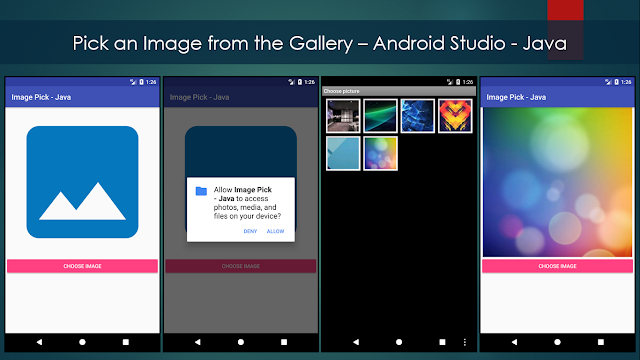
Pick an Image from the Gallery – Android Studio - Java

Image
How to Pick an Image from the Gallery? In this tutorial, we will walk through the complete process of selecting an image from the device’s Gallery in an Android application. This feature is commonly used in many modern apps—for uploading profile pictures, choosing photos for posts, or attaching images to forms. We will start by creating a simple layout with a button that the user can tap to open the Gallery. Once the button is clicked, the system’s built-in image picker will appear, allowing the user to browse their photo library and select a single image. After the user chooses an image, we will retrieve its URI and display it inside an ImageView within our app. >> Check for Java >> Check for Kotlin >> Check for Compose Code: activity_main.xml <?xml version="1.0" encoding="utf-8"?> <LinearLayout xmlns:android= "http://schemas.android.com/apk/res/android" xmlns:app= "http://schemas.android.com/apk/res-auto" ...