Posts

Showing posts with the label intent to move to another activity

Get Result From Other Activity - Android Studio - Compose

Image
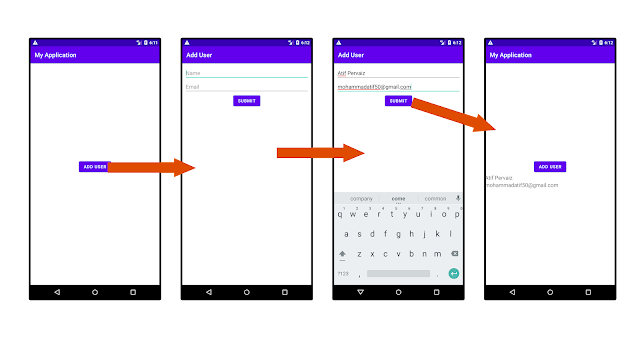
How To Get Result From Another Activity Using the registerForActivityResult? In this tutorial, we will learn how to retrieve results from another activity using registerForActivityResult. You may be aware of using the method startActivityForResult, which is now deprecated. So we will use the newer way, which is registerForActivityResult. We will create 2 Activities: the MainActivity and the FormActivity. From the MainActivity, we will launch the FormActivity to input some data and get that data back as a result to the MainActivity. >> Check For Java >> Check For Kotlin >> Check For Compose Code: MainActivity.kt package com.technifysoft.myapplication import android.app.Activity import android.content.Intent import android.os.Bundle import android.widget.Toast import androidx.activity.ComponentActivity import androidx.activity.compose.rememberLauncherForActivityResult import androidx.activity.compose.setContent import androidx.activity.result.contr...

Get Result From Other Activity - Android Studio - Kotlin

Image
How To Get Result From Another Activity Using the registerForActivityResult? In this tutorial, we will learn how to retrieve results from another activity using registerForActivityResult. You may be aware of using the method startActivityForResult, which is now deprecated. So we will use the newer way, which is registerForActivityResult. We will create 2 Activities: the MainActivity and the FormActivity. From the MainActivity, we will launch the FormActivity to input some data and get that data back as a result to the MainActivity. >> Check For Java >> Check For Kotlin >> Check For Compose Code: activity_main.xml <?xml version="1.0" encoding="utf-8"?> <LinearLayout xmlns:android= "http://schemas.android.com/apk/res/android" xmlns:app= "http://schemas.android.com/apk/res-auto" xmlns:tools= "http://schemas.android.com/tools" android:layout_width= "match_parent" android:layout_heig...

Get Result From Other Activity - Android Studio - Java

Image
How To Get Result From Another Activity Using the registerForActivityResult? In this tutorial, we will learn how to retrieve results from another activity using registerForActivityResult. You may be aware of using the method startActivityForResult, which is now deprecated. So we will use the newer way, which is registerForActivityResult. We will create 2 Activities: the MainActivity and the FormActivity. From the MainActivity, we will launch the FormActivity to input some data and get that data back as a result to the MainActivity. >> Check For Java >> Check For Kotlin >> Check For Compose Code: activity_main.xml <?xml version="1.0" encoding="utf-8"?> <LinearLayout xmlns:android= "http://schemas.android.com/apk/res/android" xmlns:app= "http://schemas.android.com/apk/res-auto" xmlns:tools= "http://schemas.android.com/tools" android:layout_width= "match_parent" android:layout_heig...

How to move From one Activity to another Activity in Android Studio (Kotlin)

Image
      DESCRIPTION       In this tutorial we will learn how to open new Activity when a Button is clicked using Android Studio in Kotlin language. When button in an activity(Main Activity) is clicked the new activity(New Activity) will be opened..       VIDEO             SOURCE CODE       Step 1:  Create a new Project  or  open new project Step 2:  Create a new Activity(e.g. Empty Activity) Step 3: Code activity_main.xml <?xml version="1.0" encoding="utf-8"?> <LinearLayout xmlns:android= "http://schemas.android.com/apk/res/android" xmlns:app= "http://schemas.android.com/apk/res-auto" xmlns:tools= "http://schemas.android.com/tools" android:layout_width= "match_parent" android:layout_height= "match_parent" android:gravity= "center" tools:context= ".MainActivity" > <Button an...

How to move From one Activity to another Activity in Android Studio

Image
In this tutorial we will learn how to open new activity when a button is clicked using android studio. When button in an activity(Main Activity) is clicked the new activity(New Activity) will be opened.. Step 1: Create a new Project of open new project: How to create a new project? Step 2: Create a new Activity(e.g. Empty Activity) Note: after clicking we will move to this activity... Step 3: activity_main.xml <?xml version="1.0" encoding="utf-8"?> <LinearLayout xmlns:android= "http://schemas.android.com/apk/res/android" xmlns:app= "http://schemas.android.com/apk/res-auto" xmlns:tools= "http://schemas.android.com/tools" android:layout_width= "match_parent" android:layout_height= "match_parent" android:gravity= "center" tools:context= ".MainActivity" > <Button android:id= "@+id/button" and...