Posts

Showing posts with the label SQLite

SQLite Course | Android Studio | Java

Image
Features in this course: ✓Add/Update/Delete data (Image & Text) ✓Pick Image from Camera/Gallery with Crop, Flip, Rotate option ✓Show data in RecyclerView ✓Search Data ✓Sort Data ✓View data in detail ✓Share data ✓Save data ✓Delete data ✓Compatible with the latest Android OS (Tested on Android Q) Buy Source Code:  https://www.fiverr.com/share/vvAEDL YouTube Chanel: https://www.youtube.com/c/MohammadAtif1 Apps/Games Playstore:  https://play.google.com/store/apps/dev?id=6868537621115215530
SQLite Kotlin – Notes App – Android Studio Tutorial

Image
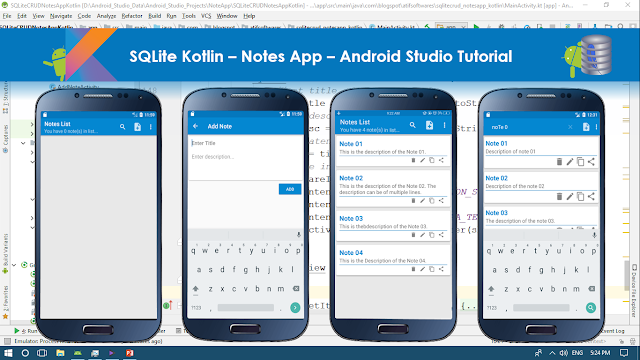
In this tutorial we will make a "Notes App" using SQLite and Kotlin. It will contain following features. ✓Enter Data ✓Retrieve Data in ListView ✓Update/Edit Data ✓Delete Data ✓Search Data ✓Copy Data ✓Share Data Step 01:  Create a new Project  or  open new project Step 02: Create layout resource file under res>layout folder Step 03: Create new "Android Resource Directory" by clicking "res>New>Android Resource Directory", choose menu from Resource type Step 04: Create menu_main.xml by clicking "menu>New>Menu resource file"  Step 05: Create empty Activity name it as "AddNoteActivity.kt" Step 06: Create Class Note.kt Step 07: Create Class DbManager.kt Step 08: Source Code build.gradle(module:App) apply plugin: 'com.android.application' apply plugin: 'kotlin-android' apply plugin: 'kotlin-android-extensions' android { compileSdkVersion 27 defaultConfig { ...

Book App using SQLite - Android Studio Tutorial

Image
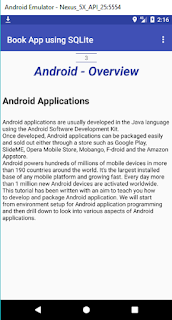
     DESCRIPTION      This tutorial is about creating the Book App using SQLite. I'll use Tabbed Activity, swipe to change the page. Each record in SQLite file contains Id(as page no), Chapter Name, Title, Detail.      VIDEO           SOURCE CODE      Step 1:  Create a new project   OR   Open your project  (Use Tabbed Activity) Step 2: Create assets folder. Place 'mybook' SQLite file in assets folder Step 3: Code Model.java package com . blogspot . devofandroid . bookappusingsqlite ; public class Model { int ids ; String chapters ; String titles ; String details ; //constructor public Model ( int ids , String chapters , String titles , String details ) { this . ids = ids ; this . chapters = chapters ; this . titles = titles ; this . details = details ; } public ...