Posts

Showing posts with the label get bitmap

Bitmap from View | Android Studio | Compose

Image
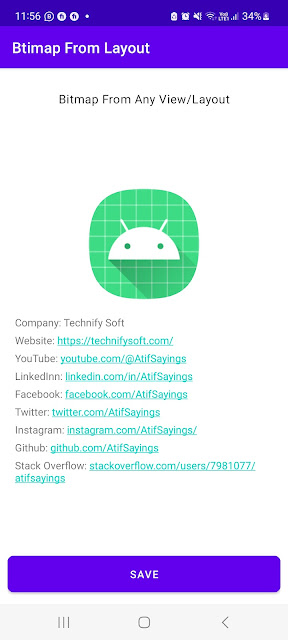
How to get and save the screenshot of a specific part of the Screen? In this tutorial, we will learn how to get the Bitmap from any UI View and Save it to Storage/Gallery. For Example, we have a LinearLayout containing some child views such as ImageView(s), TextView(s), and maybe some more UI Views. On clicking a button we will save that LinearLayout as an image in storage/gallery. So by learning this technique you can save any UI View or Layout as an image in Storage/Gallery. >> Check For Java >> Check For Kotlin >> Check For Compose Code: MaintActivity.kt package com.technifysoft.myapplication import android.content.ContentValues import android.content.Context import android.graphics.Bitmap import android.graphics.Rect import android.net.Uri import android.os.Bundle import android.os.Environment import android.provider.MediaStore import android.widget.Toast import androidx.activity.ComponentActivity import androidx.activity.compose.setCon...

Bitmap From ImageView | Android Studio | Java

Image
Exploring Bitmaps in Android Studio Using Java: A Comprehensive Guide Introduction: In the dynamic world of Android app development, understanding and effectively manipulating images are crucial skills for creating visually appealing and efficient applications. One fundamental aspect of image processing in Android is working with Bitmaps. In this blog post, we will delve into the world of Bitmaps, exploring their significance, and learning how to handle them using Java in Android Studio. What is a Bitmap?  To kick things off, we'll provide a clear definition of what a Bitmap is in the context of Android development. Readers will gain insights into how Android represents images as Bitmaps and why they are the go-to data structure for handling pixel information. Loading Bitmaps  Here, we will guide readers through the process of loading Bitmaps into their Android application. Whether it's loading from resources, assets, or the web, we'll cover the various methods available in...

Bitmap From ImageView | Android Studio | Kotlin

Image
  Exploring Bitmaps in Android Studio Using Java: A Comprehensive Guide Introduction: In the dynamic world of Android app development, understanding and effectively manipulating images are crucial skills for creating visually appealing and efficient applications. One fundamental aspect of image processing in Android is working with Bitmaps. In this blog post, we will delve into the world of Bitmaps, exploring their significance, and learning how to handle them using Java in Android Studio. What is a Bitmap?  To kick things off, we'll provide a clear definition of what a Bitmap is in the context of Android development. Readers will gain insights into how Android represents images as Bitmaps and why they are the go-to data structure for handling pixel information. Loading Bitmaps  Here, we will guide readers through the process of loading Bitmaps into their Android application. Whether it's loading from resources, assets, or the web, we'll cover the various methods availabl...

Bitmap from View | Android Studio | Kotlin

Image
How to get and save the screenshot of a specific part of the Screen? In this tutorial, we will learn how to get the Bitmap from any UI View and Save it to Storage/Gallery. For Example, we have a LinearLayout containing some child views such as ImageView(s), TextView(s), and maybe some more UI Views. On clicking a button we will save that LinearLayout as an image in storage/gallery. So by learning this technique you can save any UI View or Layout as an image in Storage/Gallery. >> Check For Java >> Check For Kotlin >> Check For Compose Code: activity_main.xml <?xml version="1.0" encoding="utf-8"?> <RelativeLayout xmlns:android= "http://schemas.android.com/apk/res/android" xmlns:app= "http://schemas.android.com/apk/res-auto" xmlns:tools= "http://schemas.android.com/tools" android:layout_width= "match_parent" android:layout_height= "match_parent" android:padding= ...

Bitmap From View | Android Studio | Java

Image
How to get and save the screenshot of a specific part of the Screen? In this tutorial, we will learn how to get the Bitmap from any UI View and Save it to Storage/Gallery. For Example, we have a LinearLayout containing some child views such as ImageView(s), TextView(s), and maybe some more UI Views. On clicking a button we will save that LinearLayout as an image in storage/gallery. So by learning this technique you can save any UI View or Layout as an image in Storage/Gallery. >> Check For Java >> Check For Kotlin >> Check For Compose Code: activity_main.xml <?xml version="1.0" encoding="utf-8"?> <RelativeLayout xmlns:android= "http://schemas.android.com/apk/res/android" xmlns:app= "http://schemas.android.com/apk/res-auto" xmlns:tools= "http://schemas.android.com/tools" android:layout_width= "match_parent" android:layout_height= "match_parent" android:padding= ...