Posts

Showing posts with the label ActionBar Menu

Options Menu Fragment - Kotlin

Image
Options Menu Fragment - Android Studio - Kotlin This will cover the followings: ✓Use Options Menu / Actionbar menu ✓Use Options Menu in fragments ✓Add items with icons in options menu ✓Show different options of an options menu in each fragment ✓Handle options menu's item clicks >>Watch For Java Video: Step 1:  Create a new Project   or   open new project Step 2: Code menu_main.xml <?xml version="1.0" encoding="utf-8"?> <menu xmlns:android= "http://schemas.android.com/apk/res/android" xmlns:app= "http://schemas.android.com/apk/res-auto" > <item android:id= "@+id/action_settings" android:title= "Settings" /> <item android:id= "@+id/action_sort" android:title= "Sort" android:icon= "@drawable/ic_sort_white" app:showAsAction= "always" /> </menu> FragmentOne.kt ...

Options Menu Fragment - Java

Image
Options Menu Fragment - Android Studio - Java This will cover the followings: ✓Use Options Menu / Actionbar menu ✓Use Options Menu in fragments ✓Add items with icons in options menu ✓Show different options of an options menu in each fragment ✓Handle options menu's item clicks >>Watch For Koltin Video: Step 1:  Create a new project   OR   Open your project Step 2: Code: menu_main.xml <?xml version="1.0" encoding="utf-8"?> <menu xmlns:android= "http://schemas.android.com/apk/res/android" xmlns:app= "http://schemas.android.com/apk/res-auto" > <item android:id= "@+id/action_settings" android:title= "Settings" /> <item android:id= "@+id/action_sort" android:title= "Sort" app:showAsAction= "always" android:icon= "@drawable/ic_sort_white" /> </menu> FragmentOne.java...

Add items/menu in Actionbar/Toolbar (Kotlin) - Android Studio

Image
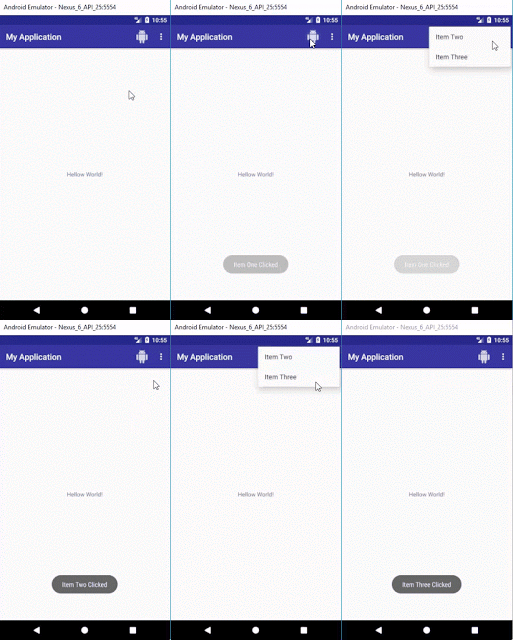
In this tutorial we will add items in actionbar/toolbar, 3-dot menu in actionbar/toolbar and handle item clicks using Kotlin. There will be three items in menu you can add as many as you want. One item will be displayed on action bar with icon, other two items will be displayed by clicking 3-dot menu... Step 1:  Create a new Project  or  open new project Step 2: Create new "Android Resource Directory" by clicking "res>New>Android Resource Directory", choose menu from Resource type Step 3: Create menu.xml by clicking "menu>New>Menu resource file" Step 4: Enter an icon in drawable folder by clicking "drawable>New>Image Asset"  Step 5: Code menu.xml <? xml version= "1.0" encoding= "utf-8" ?> < menu xmlns: android = "http://schemas.android.com/apk/res/android" xmlns: app = "http://schemas.android.com/apk/res-auto" > < item ...

Add items/menu in actionbar/toolbar android studio

Image
In this tutorial we will add items in actionbar/toolbar, 3-dot menu in actionbar/toolbar and handle item clicks. There will be three items in menu you can add as many as you want. One item will be displayed on action bar with icon, other two items will be displayed by clicking 3-dot menu... Step 1: Create a new Project or open new project Step 2: Create new "Android Resource Directory" by clicking "res>New>Android Resource Directory", choose menu from Resource type: Step 3: Create menu.xml by clicking "menu>New>Menu resource file" Step 4: Enter an icon in drawable folder by clicking "drawable>New>Image Asset" Step 5: menu.xml <? xml version= "1.0" encoding= "utf-8" ?> < menu xmlns: android = "http://schemas.android.com/apk/res/android" xmlns: app = "http://schemas.android.com/apk/res-auto" > < item ...