Posts

Showing posts with the label Simple Alert Dialog

Create Alert Dialog (Kotlin) - Android Studio
Image
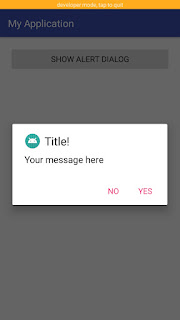
      DESCRIPTION       In this tutorial we will use Alert Dialog to alert the user whether you want to perform specific function or not. Alert Dialog will contain icon, title, message and two buttons "Yes", "No". We will show a alert dialog on button click. Android Alert Dialog (Kotlin)       VIDEO             SOURCE CODE       Step 1:    Create a new project   OR   Open your project Step 2: Code activity_main.xml <?xml version="1.0" encoding="utf-8"?> <LinearLayout xmlns:android= "http://schemas.android.com/apk/res/android" xmlns:app= "http://schemas.android.com/apk/res-auto" xmlns:tools= "http://schemas.android.com/tools" android:layout_width= "match_parent" android:layout_height= "match_parent" android:padding= "20dp" tools:context= ".MainActivity" > <Button android:id= "@...

Create Alert Dialog - Android Studio

Image
In this tutorial we will use alert dialog to alert the user whether you want to perform specific function or not. Alert Dialog will contain icon, title, message and two buttons "Yes", "No". We will show a alert dialog on button click Step 1: Create a new project OR Open your project Step 2: Code activity_main.xml: <?xml version="1.0" encoding="utf-8"?> <LinearLayout xmlns:android= "http://schemas.android.com/apk/res/android" xmlns:app= "http://schemas.android.com/apk/res-auto" xmlns:tools= "http://schemas.android.com/tools" android:layout_width= "match_parent" android:layout_height= "match_parent" android:padding= "20dp" tools:context= ".MainActivity" > <Button android:id= "@+id/showsnackbarbtn" android:text= "Show Alert Dialog" android:layout_width= "match_parent...