Posts

Permission Handling - Android Studio - Java

Image
How to handle single & multiple runtime permissions As we know we need to request Runtime Permissions on Android 6.0 (API level 23 also known as Marshmallow) and above as well as to declare them in the AndroidManifest file.  If we need to use some features like Camera, Location, Contact, etc. we have to handle the runtime permissions. In this Tutorial, we will learn how to Request Single and Multiple Permissions. Note: I'll add some permissions for example purposes only you may apply the same on permissions you want. >> Check For Java >> Check For Kotlin >> Check For Compose Video: Code: AndroidManifest.xml <?xml version="1.0" encoding="utf-8"?> <manifest xmlns:android= "http://schemas.android.com/apk/res/android" xmlns:tools= "http://schemas.android.com/tools" > <!--For Single Permission Example--> <uses-permission android:name= "android.permission.ACCESS_FINE_LOCATION" ...
SeekBar with Customization | Android Studio | Kotlin

Image
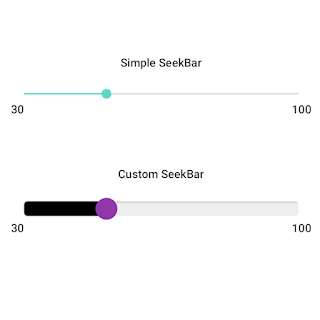
 SeekBar A SeekBar widget is an extension of the widget ProgressBar that adds a draggable thumb. The user can touch the thumb and drag right or left to change the current progress level or use the arrow keys to do the same. You may have seen photo editing apps having features to change the brightness level, blur level, and contrast level. They use SeekBar to change these options.  In this tutorial we will not only learn to use the SeekBar we will also learn how to customize for example its thumb size, color, and background. >>Check For Java<< . Simple SeekBar Let's implement the Simple Seekbar without any customization and handle the progress change listener. I'm just showing progress in TextView, you can do whatever you want. activity_main.xml <?xml version="1.0" encoding="utf-8"?> <RelativeLayout xmlns:android= "http://schemas.android.com/apk/res/android" xmlns:app= "http://schemas.android.com/apk/res-auto" ...

SeekBar with Customization | Android Studio | Java

Image
 SeekBar A SeekBar widget is an extension of the widget ProgressBar that adds a draggable thumb. The user can touch the thumb and drag right or left to change the current progress level or use the arrow keys to do the same. You may have seen photo editing apps having features to change the brightness level, blur level, and contrast level. They use SeekBar to change these options.  In this tutorial we will not only learn to use the SeekBar we will also learn how to customize for example its thumb size, color, and background. >>Check For Kotlin<< . Simple SeekBar Let's implement the Simple Seekbar without any customization and handle the progress change listener. I'm just showing progress in TextView, you can do whatever you want. activity_main.xml <?xml version="1.0" encoding="utf-8"?> <RelativeLayout xmlns:android= "http://schemas.android.com/apk/res/android" xmlns:app= "http://schemas.android.com/apk/res-auto"...

Get Result From Other Activity - Android Studio - Kotlin

Image
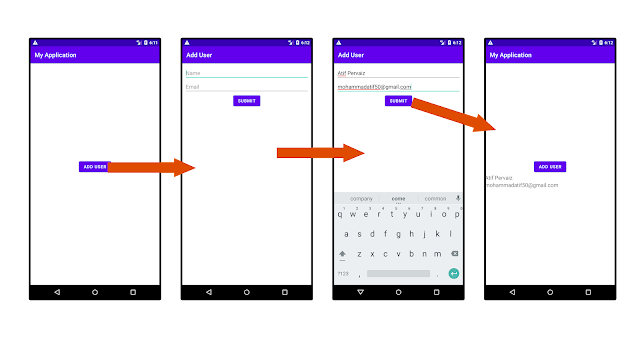
How To Get Result From Another Activity Using the registerForActivityResult? In this tutorial, we will learn how to retrieve results from another activity using registerForActivityResult. You may be aware of using the method startActivityForResult, which is now deprecated. So we will use the newer way, which is registerForActivityResult. We will create 2 Activities: the MainActivity and the FormActivity. From the MainActivity, we will launch the FormActivity to input some data and get that data back as a result to the MainActivity. >> Check For Java >> Check For Kotlin >> Check For Compose Code: activity_main.xml <?xml version="1.0" encoding="utf-8"?> <LinearLayout xmlns:android= "http://schemas.android.com/apk/res/android" xmlns:app= "http://schemas.android.com/apk/res-auto" xmlns:tools= "http://schemas.android.com/tools" android:layout_width= "match_parent" android:layout_heig...

Get Result From Other Activity - Android Studio - Java

Image
How To Get Result From Another Activity Using the registerForActivityResult? In this tutorial, we will learn how to retrieve results from another activity using registerForActivityResult. You may be aware of using the method startActivityForResult, which is now deprecated. So we will use the newer way, which is registerForActivityResult. We will create 2 Activities: the MainActivity and the FormActivity. From the MainActivity, we will launch the FormActivity to input some data and get that data back as a result to the MainActivity. >> Check For Java >> Check For Kotlin >> Check For Compose Code: activity_main.xml <?xml version="1.0" encoding="utf-8"?> <LinearLayout xmlns:android= "http://schemas.android.com/apk/res/android" xmlns:app= "http://schemas.android.com/apk/res-auto" xmlns:tools= "http://schemas.android.com/tools" android:layout_width= "match_parent" android:layout_heig...