Posts

SQLite Kotlin – Notes App – Android Studio Tutorial
Image
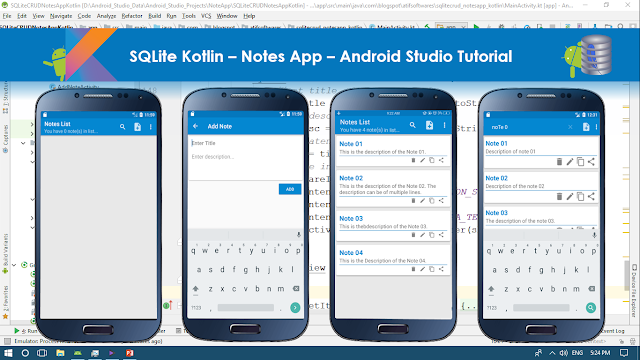
In this tutorial we will make a "Notes App" using SQLite and Kotlin. It will contain following features. ✓Enter Data ✓Retrieve Data in ListView ✓Update/Edit Data ✓Delete Data ✓Search Data ✓Copy Data ✓Share Data Step 01:  Create a new Project  or  open new project Step 02: Create layout resource file under res>layout folder Step 03: Create new "Android Resource Directory" by clicking "res>New>Android Resource Directory", choose menu from Resource type Step 04: Create menu_main.xml by clicking "menu>New>Menu resource file"  Step 05: Create empty Activity name it as "AddNoteActivity.kt" Step 06: Create Class Note.kt Step 07: Create Class DbManager.kt Step 08: Source Code build.gradle(module:App) apply plugin: 'com.android.application' apply plugin: 'kotlin-android' apply plugin: 'kotlin-android-extensions' android { compileSdkVersion 27 defaultConfig { ...
Android Firebase tutorials

Image
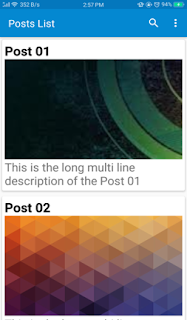
In this series we will learn using Firebase in Android app using Android Studio. We will: ✓Create Android Studio Project ✓Create Firebase Project and connect our Android Studio Project to that Firebase Project ✓Store Images to FirebaseStorage manually ✓Add data in FirebaseDatabase ✓Retrieve these data(Title, Image, Description) in RecyclerView. To retrieve Images we will use Picasso library. ✓Implement SearchView ✓Handle RecyclerView Item Clicks, When an item is clicked it will be opened in new Activity. Source Code: http://devofandroid.blogspot.com/2018/05/firebase-recyclerview-retrieve-images.html

Firebase RecyclerView: Retrieve Images & Text, Implement SearchView, Handle Item Clicks

Image
In this tutorial we will learn using Firebase in Android app using Android Studio. We will: ✓Create Android Studio Project ✓Create Firebase Project and connect our Android Studio Project to that Firebase Project ✓Store Images to FirebaseStorage manually ✓Add data in FirebaseDatabase ✓Retrieve these data(Title, Image, Description) in RecyclerView. To retrieve Images we will use Picasso library. ✓Implement SearchView ✓Handle RecyclerView Item Clicks, When an item is clicked it will be opened in new Activity. ✓Sort Firebase Data displayed in RecyclerView. ✓Save Image, Share Image & Text, Set Image as Wallpaper Step 1:  Create a new project   OR   Open your project Step 2: Choose Empty Activity & name it as "PostsListActivity" Step 3:  Create  menu.xml  under   res>menu   folder, to   search   item. Step 4: In menu bar click Tool s > Firebase . Firebase Assistent will open at right side Step 5: Scroll a...