Posts

Dialer Intent - Android Studio - Java

Image
How to launch dialer pad with a specific phone number using Intent Learn how to easily open the phone dialer or make a direct call in your Android app using Kotlin. This step-by-step guide explains how to use Intent.ACTION_DIAL and Intent.ACTION_CALL , request runtime permissions, and write clean Kotlin code in Android Studio. Ideal for beginners and professional Android developers looking to integrate calling features into their apps. >> Check For Java >> Check For Kotlin >> Check For Compose Video: Step 1:  Create a new project   OR   Open your project Step 2: Code activity_main.xml <?xml version="1.0" encoding="utf-8"?> <LinearLayout xmlns:android= "http://schemas.android.com/apk/res/android" xmlns:app= "http://schemas.android.com/apk/res-auto" xmlns:tools= "http://schemas.android.com/tools" android:layout_width= "match_parent" android:layout_height= "match_pa...

Slider using ViewPager - Android Studio - Kotlin

Image
Create slider containing TextView & ImageView using ViewPager and Single Fragment. >> Watch For Java Video: Step 1: Create a new Project or open new project Step 2: Code activity_main.xml <?xml version="1.0" encoding="utf-8"?> <android.support.design.widget.CoordinatorLayout xmlns:android= "http://schemas.android.com/apk/res/android" xmlns:tools= "http://schemas.android.com/tools" xmlns:app= "http://schemas.android.com/apk/res-auto" android:id= "@+id/main_content" android:layout_width= "match_parent" android:layout_height= "match_parent" android:fitsSystemWindows= "true" tools:context= ".MainActivity" > <android.support.design.widget.AppBarLayout android:id= "@+id/appbar" android:layout_width= "match_parent" and...

Slider using ViewPager - Android Studio - Java

Image
Create slider containing TextView & ImageView using ViewPager and Single Fragment. >> Watch For Kotlin: Video: Step 1:  Create a new project   OR   Open your project Step 2: Code activity_main.xml <?xml version="1.0" encoding="utf-8"?> <android.support.design.widget.CoordinatorLayout xmlns:android= "http://schemas.android.com/apk/res/android" xmlns:app= "http://schemas.android.com/apk/res-auto" xmlns:tools= "http://schemas.android.com/tools" android:id= "@+id/main_content" android:layout_width= "match_parent" android:layout_height= "match_parent" android:fitsSystemWindows= "true" tools:context= ".MainActivity" > <android.support.design.widget.AppBarLayout android:id= "@+id/appbar" android:layout_width= "match_parent" android:layout_height= "...

Migrating to AndroidX

Image
Description: The AndroidX maps the original support library API packages into the androidx namespace. Only the package and the Maven artifact names changed; class , method , and field names did not change. Requirements: Android Studio version 3.2 and up Target SDK version 28 i.e P (Pie) Steps: Create/Open project Click Refactor > Migrate to AndroidX The "Migrate to AndroidX" dialog will appear. Click "Migrate" The "Refactoring Preview" will open. Click "Do Refactor" Done Video:

Text Recognition App - Android Studio - Java

Image
In this video we will extract Text from the Image taken from: ✓Camera ✓Gallery Using the Google Vision API. We will also handle run-time permission for ✓CAMERA ✓WRITE_EXTERNAL_STORAGE Purchase Code: https://www.fiverr.com/share/3AmPr Libraries Used: Google Vision: https://developers.google.com/android/guides/releases Image Cropper: https://github.com/ArthurHub/Android-Image-Cropper

Technify Soft - Our Apps/Games on Playstore

Image
We develop useful Apps/Games for every kind of user: >>Check Our Apps/Games:

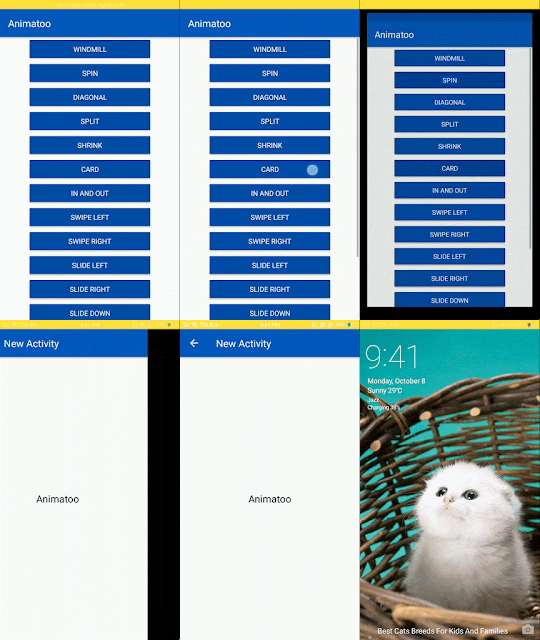
Animatoo

Image
A lightweight and easy to use Android library that provides many activity transition animations. Min SDK 16 (Android Jellybean 4.1) Written in Java Can be used in Kotlin A lightweight, easy-to-use Android library that provides awesome activity transition animations To download the demo app for this library from Google Playstore so you can see it in action, click here:   Installation Add this into your root build.gradle file: allprojects { repositories { ... maven { url ' https://jitpack.io ' } } } Add the dependency to your module build.gradle: dependencies { implementation ' com.github.mohammadatif:Animatoo:master ' } Usage Animatoo has 15 different activity transition animations: in and out. swipe left. swipe right. split. shrink. card. zoom. fade. spin. diagonal. windmill. slide up. slide down. slide left. slide right. Using Animatoo is extremely simple, A single short line of code following sta...